How GO4 works
From the first signal to confirmed recovery
GO4 connects server checks, Shopify-aware audits, browser evidence and incident history so your team can move from “something changed” to “this is what happened, here is the evidence, and it is working again.”
Monitoring lifecycle
One problem. A clear path to action.
Each stage adds context without turning every signal into noise.
Separate impact from noise
A store can be online and still have a problem worth acting on
GO4 keeps operational health and quality status separate. That distinction helps a team see whether a problem is blocking execution or degrading SEO, content or storefront quality without calling every issue an outage.
Operational health
Can the store or monitored function execute?
Availability, critical request failures and execution problems belong here. These are the signals most likely to affect whether a customer can complete an important action.
- Page unavailable
- Critical purchase path fails
- Required storefront interaction cannot complete
Quality status
Is the experience or monitored content still correct?
SEO findings, audit problems and content-quality regressions can matter even while the storefront remains available. GO4 keeps them visible without pretending the whole store is down.
- SEO metadata regresses
- Product or collection audit finds a problem
- Rendered content no longer matches the expected state
The result is a clearer priority: critical execution problems stand out, while quality issues keep the context they need for investigation.
Different signals need different evidence
Open the monitoring layer that can actually prove what changed
A server response cannot prove what a shopper saw in a loaded browser, and a browser run cannot replace Shopify-aware inventory checks. GO4 keeps those evidence paths distinct, then brings the result back into one monitoring workflow.
01
HTTP / Page
HTTP status, response time, server-side content and SSL evidence.
You need a fast server-side answer about availability, source content or certificate health.
02
Browser Lab
Rendered page state, browser timing, JavaScript, resources, screenshots and controlled journeys.
The page returns 200 but the loaded storefront, an app widget or a customer path may still be wrong.
03
JS Agent
Passive browser-side signals from storefront pageviews, including supported Custom DOM evidence.
You want browser-side regression signals from pages visitors actually load.
04
Shopify checks & audits
Cart health plus product and collection audit evidence through Shopify-aware data paths.
The risk belongs to commerce data or Shopify-specific storefront behavior, not generic uptime.
05
External Radar
Third-party apps, widgets, scripts and external resources that your public pages depend on.
You need visibility into an external provider or storefront dependency that may disappear or change.
Signal is not the same as incident
Alert on a real problem — not on every repeated observation
GO4 separates monitoring results from the incident lifecycle. A qualifying problem can open an incident; the same open incident does not need another “new problem” alert every time the check sees it again.
A monitored condition changes or fails.
GO4 evaluates how the result should affect status and incident behavior.
A new actionable problem gets a durable incident context.
The configured channel receives the new-incident notification.
Why this matters
Your team sees a problem with history and context instead of a stream of duplicate alerts for the same unresolved issue.
Investigation evidence
Move from “it failed” to “what changed?”
The useful part of monitoring starts after detection. GO4 keeps current results, history and deeper Browser Lab evidence close enough to compare what the store looked like before, during and after a problem.
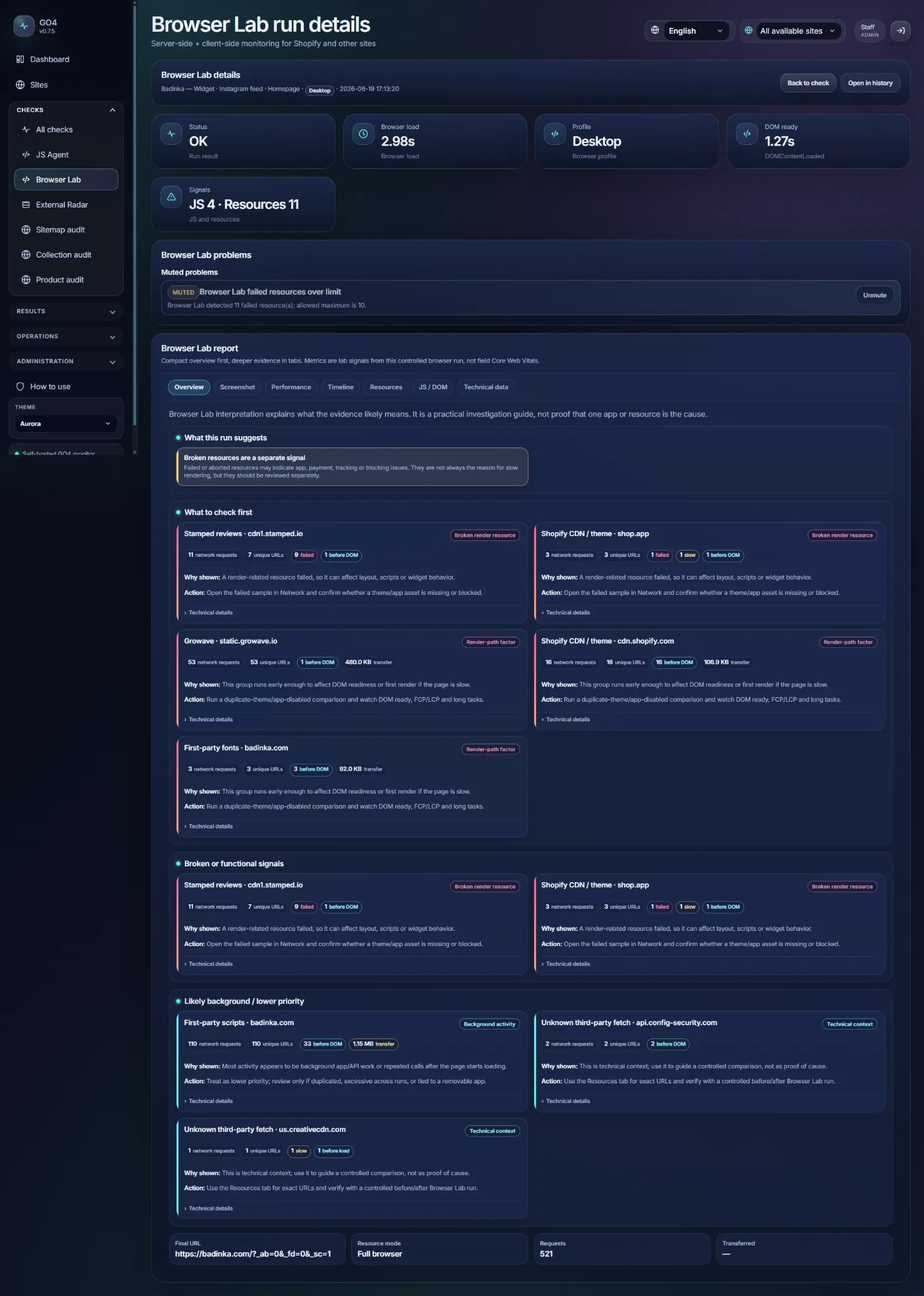
Start with the layer that detected the problem, then use historical and browser evidence only when you need deeper technical context.
Current run evidence
Open the Browser Lab report for timing, JavaScript, resources, screenshots and practical interpretation.
Historical comparison
Use Browser Lab performance summary to compare groups of runs and see whether load, TTFB, resources or browser signals really changed.
Before / after proof
When you plan a change, capture diagnostic evidence before and after it without changing normal monitoring status.
Recovery is part of the monitoring lifecycle
Knowing a problem is fixed matters as much as knowing it broke
GO4 does not need to leave a resolved incident hanging. New successful evidence can close the loop, update the incident state and send a recovery notification through the configured alert channel.
A later run shows the monitored condition has returned to the expected state.
The existing incident is closed through the normal recovery lifecycle.
The team can receive a recovered message without treating it as another new incident.
Need stronger proof after a deliberate change?
Browser Lab before/after diagnostics can compare evidence around a change while staying separate from the normal check status, Dashboard, incidents and alerts.
Shopify monitoring questions
What this workflow means in practice
The monitoring method should match the kind of failure you are trying to catch.
How is GO4 different from a basic uptime monitor?
Uptime is one signal. GO4 can also separate quality problems, inspect loaded-browser evidence, monitor Shopify-aware data paths, follow critical browser journeys and watch third-party storefront dependencies.
Does every warning or finding create an incident?
No. Operational status, quality status, muted findings, check type and incident settings have different roles. GO4 is designed so informational or muted context does not automatically become an actionable incident.
How does GO4 know when a problem has recovered?
A later successful monitoring result can close the existing incident through the normal recovery lifecycle. Browser Lab before/after proof can add separate diagnostic evidence when you want to verify a deliberate change more deeply.
Why use several monitoring methods for one Shopify store?
Because different failures leave different evidence. HTTP can confirm a server response, Browser Lab can show what a rendered page did, JS Agent can provide browser-side signals, Shopify audits can inspect commerce data and External Radar can track third-party dependencies.
Can GO4 help detect problems caused by third-party Shopify apps?
Yes, when the problem is visible in the storefront evidence GO4 can monitor. Browser Lab can verify important customer-facing widgets or modules, JS Agent can collect supported browser-side signals, and External Radar can track external resources and providers.
Does Browser Lab complete orders or enter payment details?
No. GO4 does not enter payment details or complete orders. Checkout landing can be used only as controlled evidence when the relevant capability is enabled.
Turn monitoring into a repeatable response
Detect sooner. Investigate with evidence. Confirm recovery.
Give your team one place to see what changed, which monitoring layer found it and whether the store has actually recovered.
Operational + quality contextBrowser and historical evidenceIncident and recovery lifecycle